

Andrew: Hello and welcome to bonus episode number 58 of the Culips English Podcast. I'm your host and your English study buddy, Andrew, and like always, it's wonderful to be here to kick off and start another week with you.
So, thanks for joining me, and I hope you're doing well. There's a free transcript for this episode that you can get by following the link in the description. The transcripts are a great study tool for all levels of learners.
If you're lower level, then you can follow along and listen at the same time. Or if you're higher level, then I suggest listening first and then checking your comprehension later by using the transcript.
There's an interactive version that's best if you're studying with a tablet or phone or computer. But we also make a PDF too in case you'd like to print it out and follow along with a paper version. Whatever you choose is fine by me.
We also offer premium Culips memberships for people who want to get serious about improving their English and also support the work that we do here at Culips at the same time.
So Culips members will get helpful study guides and full transcripts to all of our episodes, and on top of that, you'll also get access to our members only series, the Fluency Files, plus an invitation to our monthly member only live streams, and so much more.
There are lots of special extras that we like to give to our members. So, to learn more and to sign up, just visit our website Culips.com, or you can follow the link in the description.
Now, speaking of the member-only livestream, our June live stream is going to be happening on Thursday this week at 9pm Korean Standard Time, and we'll be hosting it in the Culips member section of our Discord server, and I'll be joined by a very special guest co-host, Alina, and some of you may know who Alina is, she's one of our study guide writers, and she's also our Discord moderator.
So, I think many of you may have met her by now. And to join the livestream, you need to be a Culips member first. And second, you also need to join our Discord server and have your status verified as a member.
Now it's super easy to do that and you can just follow the link from the dashboard after logging into your Culips account on our website, and you can follow the link from there to do that.
Of course, if you have a problem, we're here to help and we'll walk you through the process. Just send us an email to contact@Culips.com and we will try our best to help you.
And during the live stream, Alina and myself are going to open the conversation to any members who would like to participate and talk with us. It should be a lot of fun. I'm looking forward to it and I hope to see you there.
You know, I had a shower thought yesterday that I wanted to run by you. Do you know what a shower thought is? Have you heard that expression before? It's actually pretty easy to understand, I guess.
A shower thought is what we call the brilliant ideas that come to us when we take a shower. And I don't know about you, but I get a lot of great ideas when I'm in the shower.
I suppose it's a time when I'm totally alone and I'm free from technology and other distractions and I can just let the good ideas flow.
So anyway, the shower thought that I had was that maybe we should officially give a name to this bonus episode series. What do you think about that? Bonus episode is OK. I guess it communicates what kind of content you're getting.
But it's a little bit boring, right? And I'm getting a little bit tired of saying "bonus episode number blah blah blah." I don't know. Maybe we should come up with something more interesting and more creative.
So, I'd love your feedback about this. I'd like to know if you think we should name the bonus episode series something different. And if you think we should do that, then what should we call this series?
Let's talk about this on our Culips Discord this week. And we'll see what the community can come up with. If we have a great idea, then let's run with it.
Speaking of our Discord, and I know I've mentioned it several times already, but it was just so awesome to see so many people using it over the last week to practice their English.
On Thursday, I participated in one of the voice chat rooms, and I had a fun conversation with Monica from Brazil and Usako who is originally from Taiwan but is now living in Japan and also Andy from Belarus and we talked about different festivals that we celebrate in our countries in the summertime, and it was a really fun conversation.
I was also super happy to see so many people trying out the voice chat rooms on our server. I think many people tried out my challenge from last week to test and try out the voice chat rooms.
Even, I think it was on Wednesday night at one point, I noticed that all of the rooms were completely full. So that was just so awesome to see.
And I love that now, thanks to our Discord server, we have a place where the whole Culips community can gather to practice and learn English together.
So, let's keep this great start going and use our Discord this week for even more speaking, listening, reading, and writing practice. And it's true that you get to practice all of these skills on the Discord, so it's really, really fantastic in that regard.
Let's get into the main story for this week, and I have to apologize in advance again for this week's story.
Last week's story was about Pinky, and I think that story was one that non-pet people may have not enjoyed, and this week's story is one that maybe non-tech people may not enjoy because it's a little bit geeky, but this story is actually a very good representation of my week overall that I had last week so I thought I'd share it with you.
So, this last week was really a week of trial and error for my wife and me. Of course, as you know, we moved into our new house just a couple of weeks ago, but we're still in the process of setting it up and adjusting to life here.
And I think that will take a few months at least. And part of that process is getting all of our furniture and appliances installed.
Actually, right now, if you can believe it or not, I am sitting on the floor of my bedroom and recording this podcast because I don't have a desk yet and I don't have a chair yet.
So, I'm sitting on the floor recording right now. We're still not perfectly set up in this new place, but we're getting there and we're taking steps forward.
And this last week we had many people visit our house to install furniture and appliances for us. So, the first person to visit was a guy who came to measure our windows for our blinds.
Right now, we have no curtains or blinds and I actually had to tape some paper to our bedroom window so that it would block the light coming in from outside at night.
Now this is not the greatest look, and we want to get our blinds installed as soon as possible. So, the first step is having the company come and measure.
So the guy came to our house, he was measuring our windows, everything seemed to be great, he left, and then I actually took Pinky out for a walk after he left, and then about 15 minutes later, I got a call and he said, oh he forgot to do something, or he didn't take the measurement correctly or something, I'm not actually sure, but he had to come back one more time to redo something.
Now, in English, we have this saying, "Measure twice, cut once." "Measure twice, cut once." And we apply this to any kind of situation where you're building something.
And if you make a cut, like for example, if you cut a piece of wood and you didn't measure correctly, then it's really hard to fix that, usually expensive to fix that error.
So, I think the worker from the blind company definitely followed those wise words and luckily, he realized that he needed to do something again just about 15 minutes after he left.
So, it wasn't a big setback at all, although I did have to pick up Pinky and run back home when he called us. We did have some bigger setbacks though this week.
For example, an appliance company came to install our dishwasher and I have to say I feel very, very lucky to have a dishwasher. This is the first time in my adult life that I have a dishwasher, so it's very nice.
Anyway, two delivery and installation guys brought the dishwasher to our house.
They got it in place and just when I thought everything was finished and that they were ready to leave, then they realized that there was something missing and they couldn't quite install the dishwasher correctly and they had to take out the dishwasher and they actually just put it in the corner of our living room and they had to get that extra piece and they came back a couple of days later to finish the installation.
So, it was kind of like one step forward, two steps back kind of feeling with our dishwasher. But that's not everything.
On top of that, we also bought a new TV for our house, and we got it from the same appliance company, the same appliance store actually, but the TV arrived on a different day, and so it was delivered by a couple of different guys.
And as they were installing the TV for us, and I should say it's one of those TVs that hangs on the wall, as they were installing it, my wife asked them about the size of the TV, like something looked off to her.
And at that moment, we noticed that we accidentally ordered the wrong size TV. We bought a TV that was smaller than the one that we originally intended.
So then when we realized our mistake, we had to ask them to take the TV back, we had to reorder the correct sized one. And I guess that TV, the correct size one, is a popular model because it's all sold out and we'll have to wait several more weeks for a new one to come in for us.
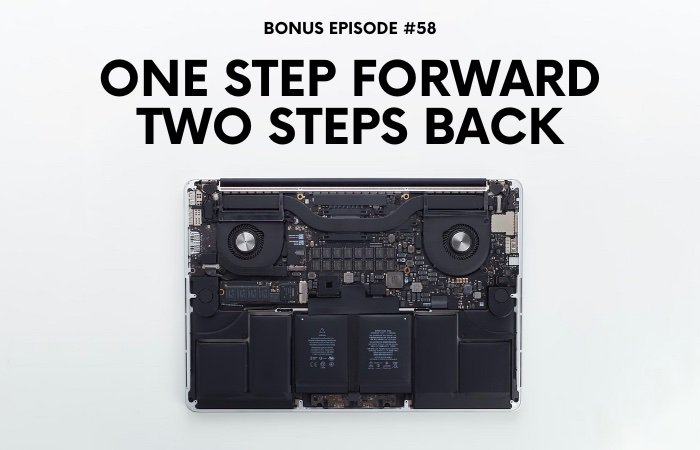
So, as you can tell, this week was a week of one step forward, two steps back. Or at least it felt that way. But in addition to those house mishaps, I also had a tech mishap that underscored this feeling and made me feel like really, I was taking one step forward two steps back last week.
So that is going to be the main story for today, my tech mishap. So let me tell you that story now and I hope you enjoy it. Here we go.
I spent a lot of time last week trying to perform an upgrade to my laptop computer. It's an older computer.
It was made in 2014 and unfortunately, it's not really powerful enough to use for Culips anymore, at least for recording and editing, audio and video, which is a big part of what we do here at Culips.
But for most day-to-day tasks for writing or for browsing the internet or researching those kinds of tasks, then it's totally fine.
Now there was one problem with the laptop though, and that was that the storage drive inside of it was really, really small.
I guess back when I bought the computer, solid state drives were just starting to become popular in laptops, and at that time they were very expensive. So, my computer originally came with a 121GB solid-state drive.
Now at first, 121GBs might sound like quite a bit of storage space. But to be honest with you, after getting the operating system files and some applications that I use often installed on the computer, I was always running out of storage space, and it was extremely annoying and made working on the computer extremely tedious.
Maybe you've experienced this before, but when you have no space left on your storage drive, the whole performance of the computer is affected, and it's not just that you can't save new files, but also you can't use your applications, like the web browser, for example, doesn't function correctly, because the web browser needs to save and cache files to function properly.
So, I was constantly playing this game of deleting files and trying to make this extremely limited amount of storage space work so that I could use the computer. And I was constantly moving files back and forth and back and forth between this little portable hard drive that I have.
And all in all, it was just frustrating and annoying to use the computer. So as a result, I didn't use it very often.
Well, a friend of mine recently suggested that I just upgrade the solid-state drive, and he told me that it was really affordable to do so these days. And he was right because I looked into it and SSDs, solid-state drives, the kind of storage drive that is used in my computer, they have really dropped in price since I bought the computer way back when in 2014 or 2015.
And I love this. When new technology comes out, it's always very expensive, right? It's cost prohibitive for most people. And cost prohibitive, which means that the price is so high that most normal people can't afford it.
Like way back when I bought my computer, a large solid-state drive was cost prohibitive for me. I couldn't afford a large storage drive, like a terabyte or two terabytes or something like that. So that's why I had to buy the smaller drive.
But then after several years and things like economies of scale and improved manufacturing processes, competition between different companies, technological advancements, and more and more people using the new technologies, all of these things drive the prices down.
And that means that these days SSDs are actually quite affordable. Now in many places around the world, and certainly in South Korea where I live and in my home country of Canada as well, inflation is a huge economic issue right now.
Prices just seem to be going up, up, up, and at least here in Korea, most people joke that the only thing that doesn't go up is our salaries.
But thankfully, at least when I look at things like the cost of an SSD today, compared to when I first bought the laptop, I can see that the price has dropped by a massive amount.
So that's one little consolation, one little thing to make me feel better. When it seems like the prices of everything around me just keep going up and up, at least when it comes to tech, we can see prices drop.
So, in the end then, I was able to buy a 1TB drive for just around $100 US, which is probably 80 or 90% cheaper than when I first bought the laptop. So, I bought the drive, but then I had to install the drive.
And since I don't do computer upgrades or repairs very often, I didn't have the correct tools. So, I also had to buy a set of specialized screwdrivers so that I could open up the back of my laptop to replace the old drive with the new one.
So, I bought the drive, and I bought the tool set online and just a few days later they arrived at my door.
Did you hear the recent Simplified Speech episode that we released just a couple of weeks ago where Suzanne and I talked about how we use our computers and how we browse the internet?
We talked about tabs and bookmarks and lots of fun things. Well in that conversation, we actually kicked off the conversation by talking about how comfortable we feel using computers.
That episode number is Simplified Speech 172, I’ll link it in the description for anyone who wants to listen to it if you haven't done so already.
But spoiler alert, in that episode I do mention to Suzanne that I feel overall pretty comfortable using computers and doing some simple repairs on them too.
Nothing too extreme of course, but the basics like changing the storage drive, those are the kinds of things I feel comfortable doing.
So then of course I felt pretty confident that swapping out the old drive for the new drive would be pretty easy. And on one hand I was right, but on the other hand I was totally wrong.
So let me tell you exactly what happened. Before starting the procedure, I watched a tutorial on YouTube about how to do the upgrade and then I got to work. And I was expecting that it would take me like 30 or 40 minutes to do, but it ended up taking over a day.
So, first of all, I had to open up the back of my laptop so I could access the main part of my computer and install the new drive. There were about 12 or so screws on the back that I had to unscrew.
I used one of my new screwdrivers to do that and I was able to open the case with no problems. So, step one was successful all clear time to move to step two.
The next thing that I had to do then was remove a screw that was holding the solid-state drive in place in the computer.
Now this is where I had my first problem because I had to use a different sized screwdriver for this job, and it seemed like the new screwdriver wasn't exactly the correct perfect tight fit that I needed.
The screwdriver seemed to be ever so slightly too small for the screw hole and I tried repeatedly to unscrew the screw, but it just wouldn't come loose. And I became worried that I was going to strip the screw.
Now stripping the screw means that the screw's head, the place where you put the screwdriver in the hole, that becomes damaged, and it makes it difficult to turn or remove using a screwdriver.
Now if I ended up stripping the screw, then I'd really be in a lot of trouble and probably would have to stop the upgrade there because it would be impossible to remove the screw.
So, what I did was I tried several times and when it wasn't working, then I stopped. I put down my screwdriver, I took a breath of fresh air, I relaxed, I refocused, and I tried one more time.
So, to remove the screw, I put as much pressure down on the top of the screw as I could without breaking the laptop itself because a laptop is very fragile, right?
You don't want to put too much pressure on it, or you'll crack the whole thing, but I put as much pressure down as I could and then I gave it one more try and bingo it worked!
The screw came loose. So, after that it was an easy process of just swapping out the old drive with the new one, reassembling the computer, and putting everything back together.
So, I installed the new drive physically into the computer but now there were some software things that I had to do, and I had to install the operating system onto the new drive because it was a blank drive with no software installed.
I use an Apple computer and without boring you about all the technical details, Apple has a very easy way to install the operating system onto a new drive just like this and you don't even have to use a disk or a USB key or anything.
You can just connect the computer to the internet, download and install the operating system and it's supposed to be quite easy to do this.
But of course, nothing is easy for me, so I tried doing that, but my computer wouldn't connect to the internet, and I just kept getting an error and that method wasn't working for me.
And that was OK because there's another way that you can install the operating system onto the new drive and that is by using a USB key that has the installation file on it.
But the problem was I didn't have a USB key, so I had to run to the nearest store and buy a USB key and it was very cheap, very affordable.
That's another thing that I realized that wow storage in general has really dropped in price dramatically from when they first came out. So, the USB key was only around $3 American, so very, very cheap.
Anyway, so I bought the new USB key. I made the OS installation file, and then I loaded it onto the new drive.
It only took about 30 minutes, but then finally I had installed the new operating system, which sometimes we call OS, the new OS, onto the new drive.
So, the OS file that I had used was the same version that my old storage drive had installed. And that version is several years out of date.
It's a very old operating system and it's kind of difficult to use that operating system now because it's not supported by Apple anymore, and so I thought upgrading to the most recent operating system would be something good to do in this situation.
I wanted to do this a long time ago, but actually I didn't have enough space on my original storage drive to update the operating system. So now that I had a much bigger drive, I wanted to update to the newest software.
So, I went to go ahead and do that. I downloaded the file without any problems, but as it was installing, I got an error telling me that I couldn't install the OS because my new storage drive's firmware wasn't compatible with the operating system file.
And firmware is what we call the software that's embedded into hardware. So, it seemed like I had run into a brick wall. I wasn't exactly sure how to overcome this problem.
And I thought, maybe I'm just going to be stuck using this old, outdated operating system with this laptop for forever, for the rest of its life. But I decided to not give up.
I went to Google and that is what all my friends who work in IT always recommend doing is when you have a tech problem, just Google it and learn from somebody else's trial and error.
So that's what I did. I Googled it and I read some stories from other people who had had this issue and I learned that the problem is caused by using a non-Apple storage drive and the new storage drive that I bought is actually made by a different company not by Apple, so that's where the problem was.
But I read online that if you install the upgrade on an Apple drive first and then do it on the new drive, it'll work. So, I decided to try that. So that means that I had to put my original Apple-manufactured drive back in the computer.
So, I took the computer apart again, I put the old drive in, I reassembled the computer, and then I started up the computer to download that new operating system to that old drive.
But then of course, I ran into the problem where I didn't have enough space on that drive to install the new operating system. So that meant that I had to back up the drive and then completely erase it, and we call that formatting.
So, I had to format the drive, and then once that drive was empty, then I had enough storage space where I could download the most recent operating system to that old drive and get it installed.
So, I did all of that and it went smoothly, thankfully, but then the next step was I had to remove that old small drive and put the new drive back in.
So that means I had to take the computer apart again, put the new drive in, reassemble the computer again and then finally I was ready to install the new operating system on the new drive and bingo it worked.
The solution that I read about on Google was perfect and I was able to complete the upgrade this way.
So, as I said earlier, I went into this foolishly thinking that I could finish this whole thing in like 30 or 40 minutes but as I said this actually took me over a day to complete all of this work.
So, I think the lesson that I'm going to take away from this upgrade adventure is to always be prepared for unexpected surprises.
I don't usually tinker with things very often and tinker means to make small changes or repairs to machines or computers to understand or improve them.
I don't really tinker very often or repair things very often except for making minor adjustments to my bike or my computer, but I bet that people who tinker often know that when you dismantle and take apart a machine, there are many things that can go wrong, and you won't know how to fix them until you experience it firsthand.
So that was my big computer upgrade experience from this week, but it's all good because at the end of the day, I was able to breathe new life into this old computer.
And ultimately it's gonna be good for you too because I'm gonna be using this computer to do work for Culips which in the end will result in more and more and better and better podcast episodes and English lessons for you all to learn with and enjoy.
So I guess in the end, this week is a win-win for me and also a win-win for you.
And now it's time for this week's vocabulary lesson.
So, in this episode I talked about how I swapped out my old storage drive in my laptop for a new drive. And that's the key vocabulary that I want to teach you about today. To swap out. To swap out.
It's a phrasal verb and to set the stage for this vocabulary lesson and give you some more context.
Why don't we go back to the part of the story where I used this phrasal verb, and we'll listen to that sentence another time or two just so we can hear how it naturally came out of my mouth.
So, let's rewind, go back and we'll take a listen now and then we'll talk about what this phrasal verb means and how you can use it in your English to make your English sound natural. But first, let's listen again. So, here we go.
So then, of course, I felt pretty confident that swapping out the old drive for the new drive would be pretty easy.
Now let's talk about what swap out means. So, as I said, it's a phrasal verb and swap out means to replace something with another thing.
And typically, we use this phrasal verb when we talk about exchanging or changing something very quickly or very simply.
And we remove one thing and put a different thing in its place, just like I swapped out the storage drive. I took the old drive out and I put the new drive in or in other words, I swapped out the drive.
So now that we know what it means, it's time for some example sentences. I've got three prepared here for you that will give you an idea about how English native speakers use this kind of vocabulary in their regular everyday lives.
So, let's listen to the first example sentence now. Here we go.
Example sentence number one.
You know, our kitchen would look way better if we swapped out these standard-looking knobs on the cabinet doors with some more stylish ones.
Let's break this example sentence down. In this example, we hear a guy say that he wants to upgrade his kitchen by swapping out the knobs on his kitchen cabinets. And knobs are those little handles that you use to pull open your cabinet in your kitchen.
Kind of the little thing that your hand can grab onto to help you open the cabinet door. And of course, you can usually just screw in and screw out the knobs, so they are easy to swap out if you want to change them with a different look.
And I guess the speaker of that example sentence wants to swap out the knobs on the kitchen cabinets so that he can have a more stylish looking kitchen.
Example sentence number two.
I heard some good news today. Finally, we're going to be swapping out the old printers with new, more efficient ones.
Let's break this example sentence down. In this example, it sounds like maybe a guy at a company is talking to one of his coworkers and he said that he heard some good news and that the printers will be swapped out in maybe the print room at his office.
So that just means the old printers will be replaced with newer, better printers.
Example sentence number three.
Now that the weather is getting colder, I think it's about time that I swap out my tires and put my winter tires on. You never know when it's going to snow.
Let's break this final example sentence down. In this example sentence, which I think is a very Canadian example sentence, the speaker is talking about swapping out his tires for his new tires, which are going to be winter tires.
So, if you're from a hot climate, maybe you don't know about this, but in cold climates, wintery climates, where there's a lot of snow and ice on the ground in the winter, you need to use a special kind of tire, which we call a winter tire, that will help you stay safe when you're driving in those slippery icy, wintery conditions.
So, in that sentence then, the speaker just wants to swap out his tires and he wants to replace his regular tires with his special winter tires before the snow falls.
So that's it for this week's bonus episode. Thank you for joining me and congratulations on completing an English study session with me today.
If you enjoy listening and learning with Culips, please consider supporting what we do by becoming a Culips member and you can find all the details and sign up by visiting our website Culips.com.
So, guys, my back is starting to hurt from sitting on the floor here. So, I'm gonna wrap things up, but I'll be back soon with another new episode and hopefully a desk and chair by then as well.
And I will talk to you soon, so take care and goodbye!
